Givecentral Training Sessions

We are delighted that you have chosen to join the leading organization dedicated to helping you achieve your fundraising and community engagement goals.


At GiveCentral, our mission is to help your church, charity, or nonprofit succeed. To support this, we offer an exceptional training experience designed to teach you the essentials of using GiveCentral's SmartTools effectively, particularly those critical to your success.

We highly recommend participating in this training program. Experience has shown that organizations that follow this structured approach begin to see measurable success within weeks.
Givecentral Training Info graphic

Our training sessions are tailored for clients who wish to enhance their knowledge and skills on the GiveCentral platform, including GC SmartTools and various features. Each session will provide helpful tips and ideas to strengthen giving and engagement. Throughout our training, you'll have opportunities to exchange ideas and gain insights from your peers. Additionally, you can reference all the training materials in our Knowledge Center. Our training program is structured to help you focus on the tools and features that best suit your organization's needs.

The GC Training Program includes four 60-minute training sessions covering

GiveCentral Training Session 1: Platform Overview & Basic Setup

Get started with GiveCentral by exploring the platform from both the donor and administrator perspectives. This session covers the essential tools and setup needed to manage your location and begin using GiveCentral effectively.

You'll also learn how to:

  • Explore the donor experience and donor account
  • Navigate and customize your GiveCentral admin account
  • Manage administrator access and your location homepage
  • Create and organize events
  • Understand event types and Personalized Giving Pages
  • Connect events with your database, including Camino, Ministry Platform, or QuickBooks, if applicable

This session is recommended for new administrators and anyone looking for a refresher on GiveCentral's core features.


Register for Training

Training Image

Tuesday, October 27 at 2:30PM CT

Register Now!
Training Image

Wednesday, October 28 at 1:30PM CT

Register Now!
Training Image

Thursday, October 29 at 10:00AM CT

Register Now!
Training Image

Friday, October 30 at 10:00AM CT

Register Now!
Training Image

Monday, November 2 at 1:00PM CT

Register Now!

GiveCentral Training Session 2: Engagement Tools & Sharing Options

Explore different ways to share GiveCentral and promote it to your donors. This session introduces engagement tools that can make it easier for donors to engage with your organization.

You'll discover how to:

  • Generate links and QR codes for Events, payment pages, and GiveCentral pages, including customized links using selected Events
  • Upload offline gifts to keep a record of offline donations in GiveCentral, if applicable
  • Get an overview of engagement tools, including Text-to-Give and Engagement Forms, with basic setup and reporting
  • Get introduced to Smart Stickers, Digital Wallets, and GiveCentral Tap
  • Understand donor email receipts for different transaction situations

This session is ideal for administrators looking to learn more about GiveCentral's engagement tools and expand their use of the platform after getting a grasp of GiveCentral's basic setup and core features.

Register for Training

Training Image

Tuesday, October 27 at 9:00AM CT

Register Now!
Training Image

Wednesday, October 28 at 2:30PM CT

Register Now!
Training Image

Thursday, October 29 at 9:00AM CT

Register Now!
Training Image

Friday, October 30 at 1:30PM CT

Register Now!
Training Image

Monday, November 2 at 9:00AM CT

Register Now!

GiveCentral Training Session 3: Communication Portal

Learn how to use GiveCentral's Communication Portal to craft and send effective emails to your donors and broader audience, customize communication templates, and analyze campaign performance.

You'll learn how to:

  • Navigate the Communications Portal and access your global templates
  • Customize and send professional emails using pre-built templates or create your own content
  • Track email campaign performance and engagement
  • Get introduced to GC SmartLinks and GC SmartGive

This session is ideal for administrators looking to strengthen their donor communication and make better use of GiveCentral's email and outreach tools.

Register for Training

Training Image

Tuesday, October 27 at 10:00AM CT

Register Now!
Training Image

Wednesday, October 28 at 9:00AM CT

Register Now!
Training Image

Thursday, October 29 at 1:00PM CT

Register Now!
Training Image

Friday, October 30 at 9:00AM CT

Register Now!
Training Image

Monday, November 2 at 10:00AM CT

Register Now!

GiveCentral Training Session 4: Reports & Donor Management

Learn how to use GiveCentral's reporting tools and donor management features to effectively monitor giving activity and manage your donor database. This session covers the key reports you'll use regularly, along with the tools needed to review transactions, reconcile deposits, process refunds, and manage donor accounts.

You'll learn how to:

  • Generate and interpret key SmartReports
  • Review transaction activity and reconcile deposits
  • Issue refunds and understand payment processing
  • Create, edit, and merge donor accounts
  • Update donor IDs and manage donor profiles
  • View donor giving history and edit recurring gifts

This session is ideal for administrators responsible for reporting, reconciliation, and day-to-day donor management.

Register for Training

Training Image

Tuesday, October 27 at 1:30PM CT

Register Now!
Training Image

Wednesday, October 28 at 10:00AM CT

Register Now!
Training Image

Thursday, October 29 at 2:00PM CT

Register Now!
Training Image

Friday, October 30 at 12:00PM CT

Register Now!
Training Image

Monday, November 2 at 2:00PM CT

Register Now!

To view all of GiveCentral's training materials and videos, please visit your Knowledge Center, located on your GC Dashboard.

For questions regarding materials, videos, and training, please email implementation@givecentral.org
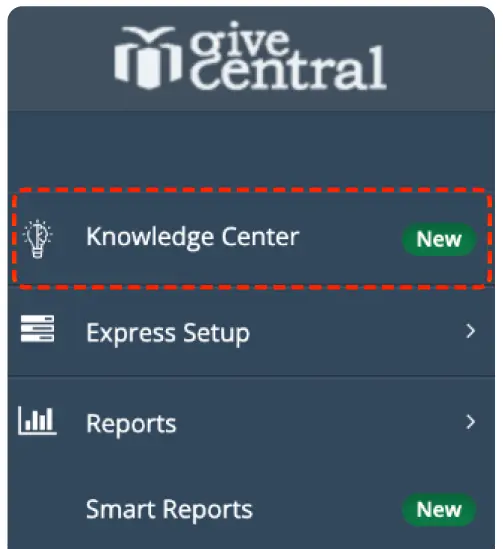
Knowledge Center Screenshot

Want to Learn More About our SmartTools and Get Started?

Fill out our form below and we'll contact you with more information.


Contact Us

Office Location

512 Chestnut Street
PO Box #277
Winnetka, IL 60093-2400

Phone Number

Tel: (833) 716 - 2612
Fax: (312) 893 - 2038